Blog 1: Complete Overview & Autopilot Video Creation Workflow
Introduction:
No Tension AI Studio is an all-in-one desktop AI video production suite designed to turn any raw video footage into a viral, monetizable YouTube Short, TikTok, or high-retention video on autopilot. It replaces the tedious manual work of 4 separate freelancers (Scriptwriter, Voiceover Artist, Video Editor, and Subtitler) into a single streamlined desktop workflow.
Core Workflow Steps:
- Smart Scene Analysis: The AI automatically scans video action, identifies high-energy visual moments, and detects speech audio patterns.
- AI Script & Viral Hooks: Generates psychology-backed curiosity hooks (0–3 seconds), story pacing, and engagement-boosting call-to-actions.
- Studio Human Voiceover: Synthesizes ultra-realistic human voices with emotional inflections, customizable speed, and pitch control.
- 1-Click Fast Render: Burns animated Hormozi captions, background music with smart ducking, and exports ready-to-upload high-definition video.
Blog 2: System Requirements & GPU Hardware Optimization
Introduction:
To achieve blazing-fast rendering and real-time AI subtitle generation, ensure your PC meets the recommended hardware specifications below. Dedicated GPU acceleration dramatically reduces rendering time.
Recommended Specifications (Fastest Render):
- Operating System: Windows 10 / Windows 11 (64-bit)
- Processor (CPU): Intel Core i5/i7 (10th Gen+) or AMD Ryzen 5/7 (3000 Series+)
- Graphics (GPU): NVIDIA GeForce RTX 3060 (12GB) or higher (Ultra-Fast 60FPS AI Export)
- Memory (RAM): 16 GB DDR4/DDR5 Dual Channel
- Storage: 2 GB free SSD space for project caching and rendering
Minimum Hardware Requirements:
- Operating System: Windows 10 (64-bit)
- Processor (CPU): Intel Core i3/i5 (8th Gen+) or AMD Ryzen 3/5
- Graphics (GPU): Minimum 6 GB Dedicated VRAM GPU (NVIDIA GTX 1660 / RTX 2060 6GB or equivalent)
- Memory (RAM): 8 GB – 16 GB RAM
- Storage: 1 GB free disk space
Blog 3: VIP License Activation Guide
Introduction:
Activating your VIP license unlocks full access to all AI features, premium neural voice models, and unlimited high-definition video exports with zero watermarks.
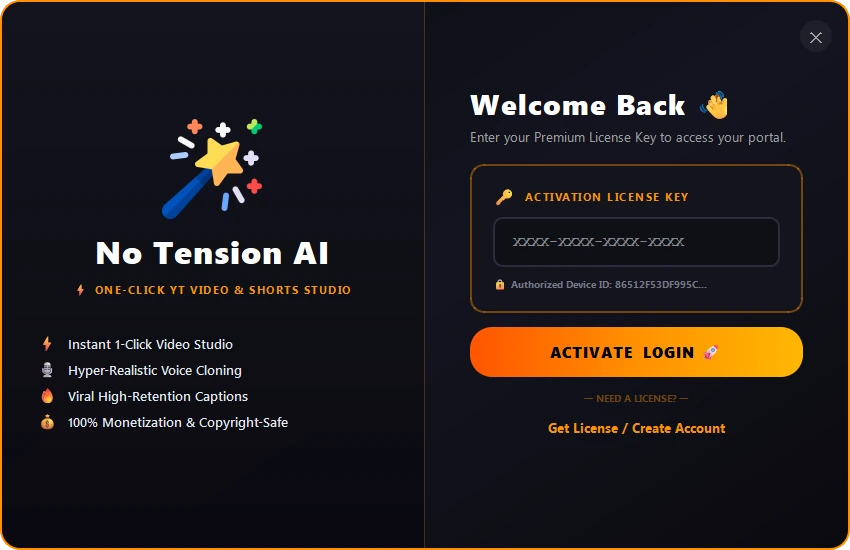
Activation Steps:
Open Activation Screen
Launch No Tension AI Studio and navigate to the VIP Activation window.
Enter Your VIP License Key
Enter the username and VIP License Key you received upon purchase from AmarAutomation.
Instant Activation
Click Login / Activate to unlock all studio modules, viral presets, and unlimited exports.
Blog 4: 60-Second Quickstart – Creating Your First Viral Video
Introduction:
Follow this fast 6-step walkthrough to turn any raw video clip into a polished, high-converting video ready for social media publishing in under a minute.
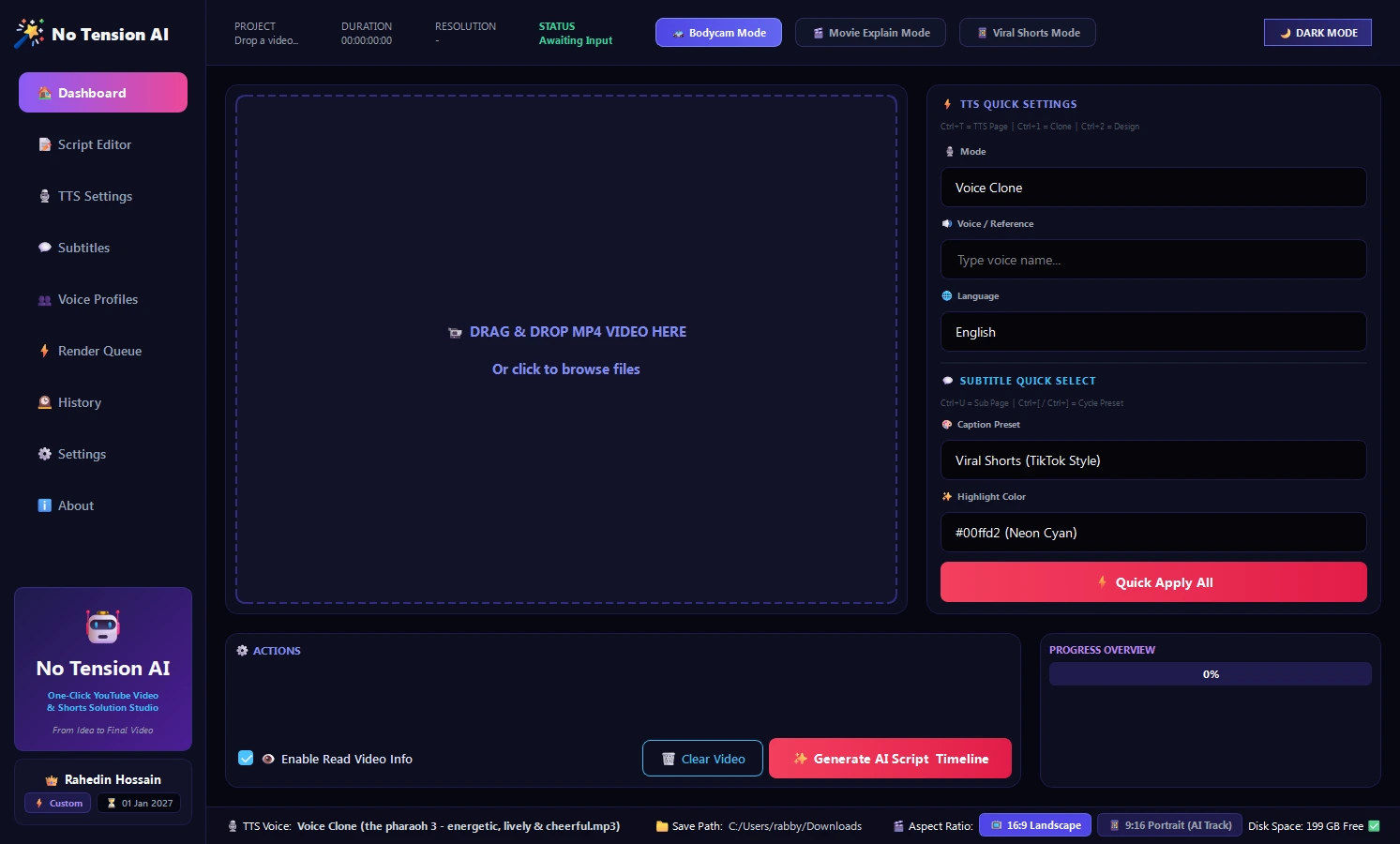
Step-by-Step Instructions:
- Import Raw Video: Drag and drop any video file (
MP4,MKV, orMOV) into the Dashboard drop zone. - Choose Aspect Ratio: Select 9:16 Vertical for YouTube Shorts, Reels, and TikTok, or 16:9 Landscape for long-form YouTube videos.
- Generate AI Script: Click Analyze & Generate Script. The AI inspects scene dynamics and writes an audience-captivating hook.
- Select Voice Actor: Choose from 40+ human neural voice profiles (e.g., Marcus Deep Tech, Sarah Storyteller, or Liam Energetic).
- Apply Dynamic Subtitles: Select Hormozi Pop-Up with vibrant Yellow/Green highlight animations.
- 1-Click Fast Render: Click the glowing ⚡ 1-Click Fast Render button. Your ready-to-publish video will be exported to your output folder.
Blog 5: Script Studio & High-Retention Hook Formulas
Introduction:
Viewer retention on modern video algorithms is won or lost in the first 3 seconds. The Script Studio incorporates proven viral copywriting frameworks to maximize watch time and viewer completion rates.
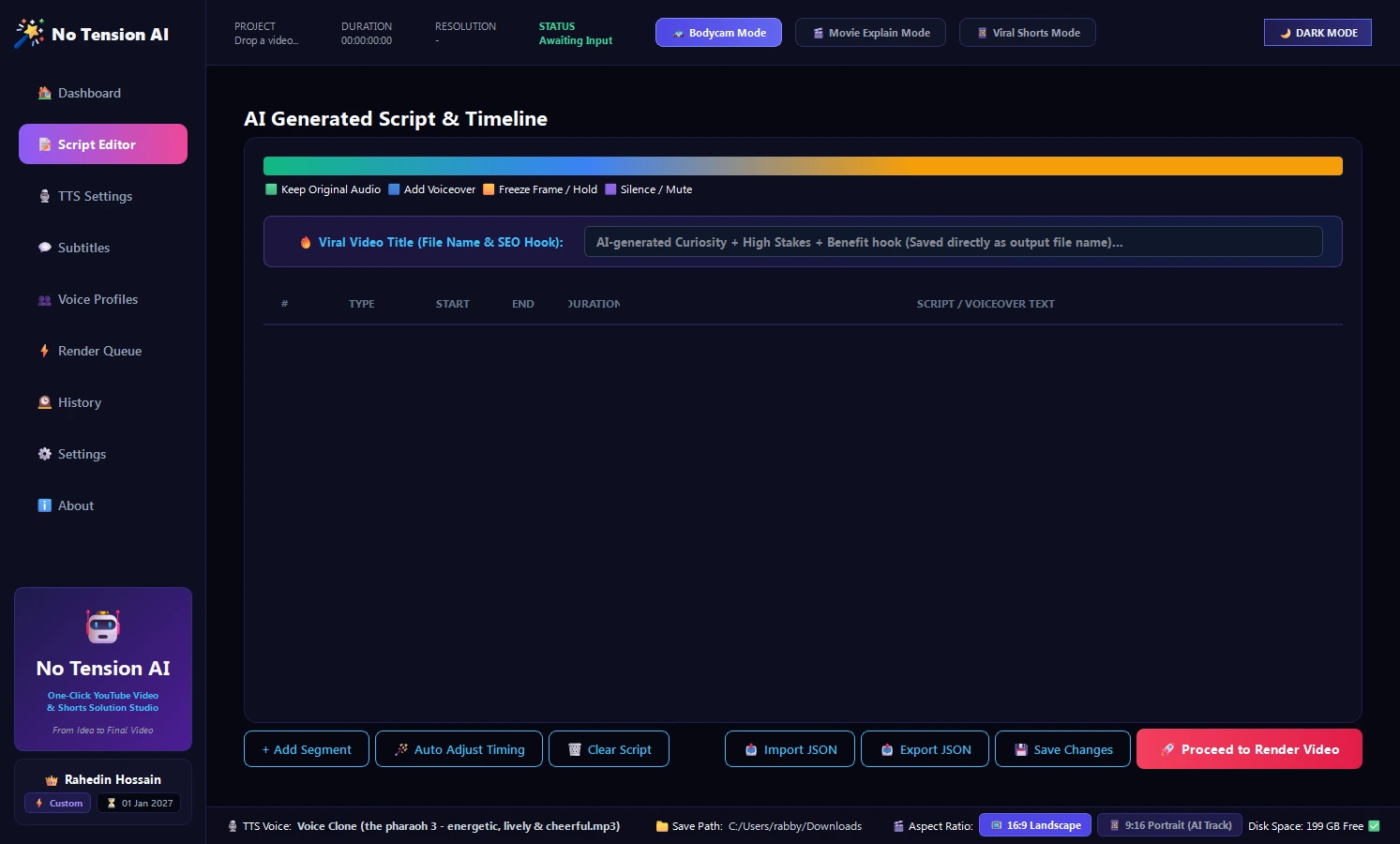
Key Scripting Features:
- Viral Hook Frameworks: Pre-built formulas for curiosity mysteries, shocking statements, and cliffhangers that stop viewers from swiping away.
- Real-Time Pacing Meter: Calculates words-per-minute (WPM) to ensure the spoken voiceover fits your video length perfectly.
- 1-Click AI Polish: Automatically rewrites your sentences to be punchier, more energetic, or comedic with a single click.
- Multi-Segment Structure: Separate tabs for Hook (0–3s), Body Explanation, and Call to Action (CTA).
Blog 6: Voice Cloning & Studio-Grade TTS Setup
Introduction:
Eliminate robotic text-to-speech voices. No Tension AI utilizes state-of-the-art neural voice synthesis models with natural breathing patterns, emotional inflection, and studio-grade acoustics.
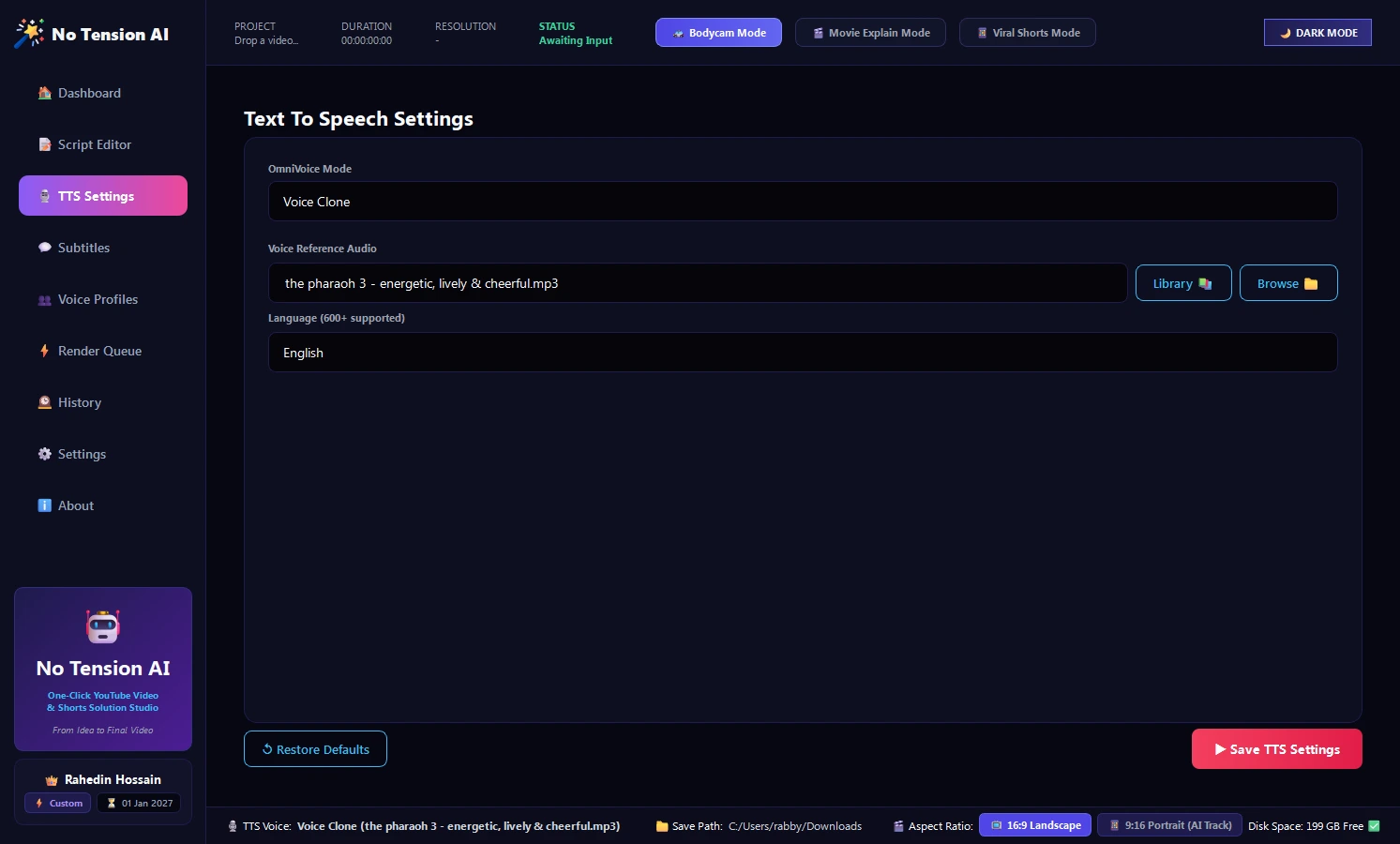
Steps to Customize Your Voiceover:
- Select Voice Profile: Browse the curated library of 40+ male and female neural voices categorized by energy level and accent.
- Adjust Speed & Pitch: Set voiceover speed between
1.10x – 1.15xfor optimal Short-form retention pacing. - Custom Voice Profile Cloning: Go to the Voice Profiles tab, upload a 30-second clean audio sample of your own voice, and generate a personal voice clone.
- Automatic BGM Ducking: Enable Smart Ducking so background music automatically lowers in volume whenever the voice actor speaks.
Blog 7: Dynamic Alex Hormozi Subtitles & Animated Captions
Introduction:
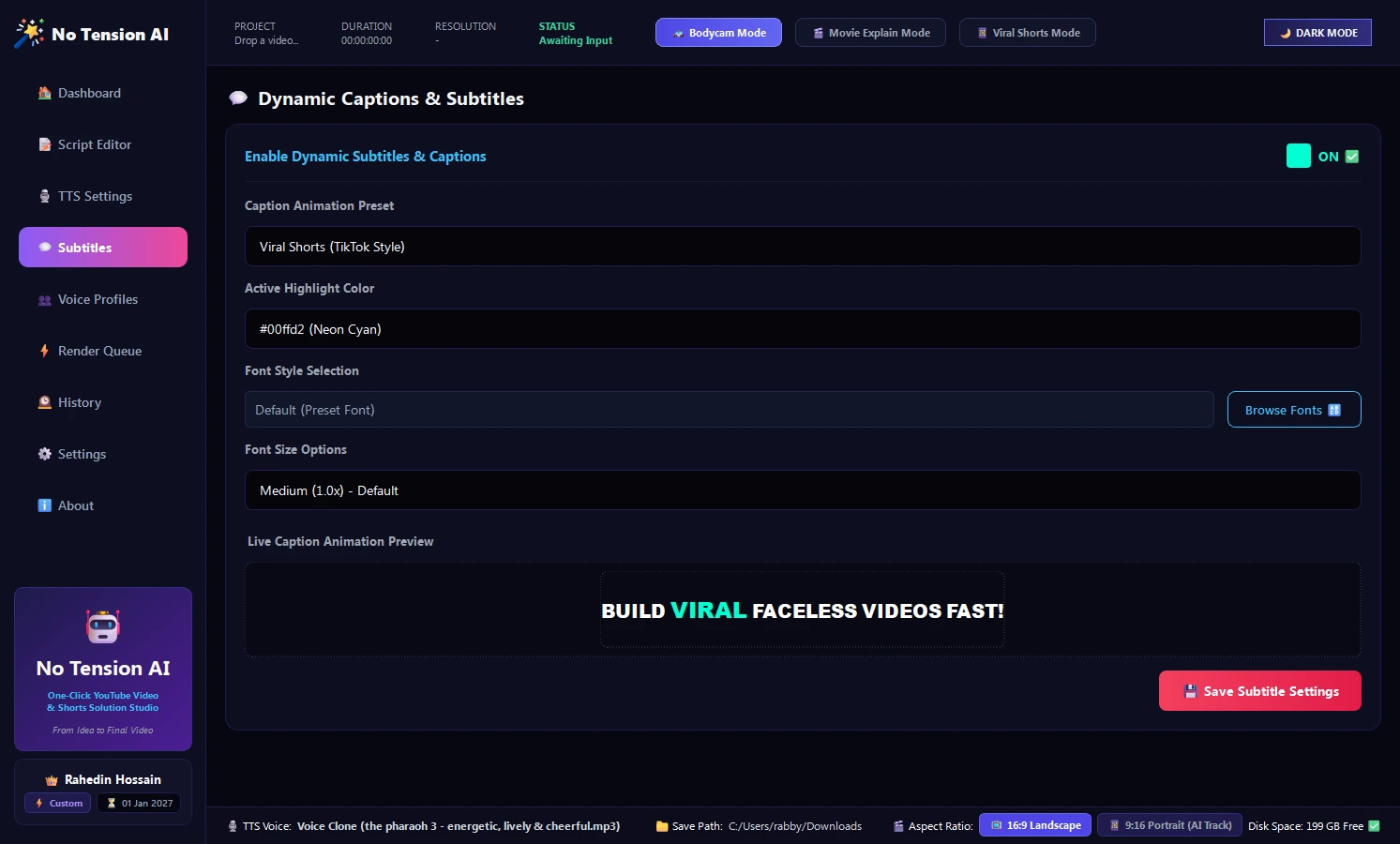
Over 80% of viewers browse social media feeds with their audio muted. Dynamic, word-by-word animated subtitles grab immediate attention and boost viewer retention throughout the entire clip.
Popular Preset Styles:
- Alex Hormozi Style: Uppercase bold typography with neon yellow and green active-word highlights and a strong black border outline.
- MrBeast Style: Clean, high-contrast center text with colored emphasis boxes for maximum readability on small mobile screens.
- Cyberpunk Neon: Glowing cyan and magenta text with ambient lighting effects for gaming and tech niches.
- Clean Documentary: Minimalist lower-third subtitle layout with soft drop shadow for educational and finance channels.
Blog 8: Visual Overlays, SFX & Smart Face Tracking
Introduction:
Transform widescreen 16:9 landscape footage into 9:16 vertical shorts without losing the main subject. The Smart Auto-Tracker detects faces in your video and dynamically keeps the speaker centered in frame at all times.
Key Visual & Audio Enhancements:
- Smart Face Tracking: Automatically pans and crops widescreen footage to keep human faces perfectly framed.
- Animated Progress Bars: Visual timeline bar at the top or bottom of the screen showing video progress to reduce drop-offs.
- Dynamic Zoom Punch: Adds subtle 10% zoom punch-ins on key punchlines to keep viewer attention engaged.
- Automated Sound Effects: Built-in "Whoosh", "Pop", and "Ding" SFX synced automatically to scene changes and on-screen text appearances.
Blog 9: Complete Step-by-Step Blueprint for Viral 9:16 Shorts
Introduction:
Follow this 4-step production checklist to consistently generate viral videos for YouTube Shorts, Instagram Reels, and TikTok:
Step 1: Load Video & Enable Smart Face Tracking
Select 9:16 Vertical canvas mode, drop your video clip, and enable Face Tracking to keep the subject centered.
Step 2: Generate Curiosity Hook (120–140 Words)
Use the Script Studio to generate a 50–60 second script with a high-curiosity opening hook in the first 3 seconds.
Step 3: Select Energetic Voice & Hormozi Captions
Choose an energetic voice actor set to 1.10x speed and apply Hormozi Pop subtitles with yellow active-word highlights.
Step 4: 1-Click Render & Upload
Click ⚡ 1-Click Fast Render. Within seconds, your high-definition video is ready for immediate publishing.
Blog 10: Faceless YouTube Cash Cow Long-Form Video Pipeline
Introduction:
Creating 8-to-15 minute long-form videos for documentary, finance, technology, or storytelling channels is effortless with No Tension AI Studio's multi-clip timeline:
Production Steps:
- Set canvas mode to 16:9 Landscape (1920x1080).
- Import multiple B-roll video clips into the media library.
- Paste your long-form article or script into the Script Studio. The software automatically syncs scene transitions to your paragraph breaks.
- Enable Automatic BGM Audio Ducking so your background music automatically quiets down during dialogue and rises during dramatic pauses.
- Export in Full HD 1080p 60FPS for YouTube monetization.
Blog 11: GPU Acceleration Settings & Audio Mastering
Introduction:
Optimize your export settings under ⚙️ Settings > Video Engine to match your system hardware for maximum rendering efficiency:
Audio Mastering Standards:
- Voiceover Loudness: Normalized to standard streaming broadcast volume for crystal-clear playback on mobile and headphones.
- Background Music: Calibrated to sit comfortably under dialogue without overpowering the narrator.
- Dynamic Ducking: Automatically lowers music volume by 12dB whenever speech begins.
Blog 12: Troubleshooting & Frequently Asked Questions (FAQ)
Introduction:
Quick answers to common questions, rendering tips, and account management:
Why is my video export taking longer than expected?
Check your Video Engine setting in the software Settings tab. If you have an NVIDIA RTX 3060 or a minimum 6GB graphics card, switch from Standard CPU to NVIDIA NVENC or Intel QuickSync to increase rendering speed by up to 5 times.
Can I use my VIP license if I get a new computer?
Yes. If you upgrade or change your PC, simply contact our VIP support with your order details and we will quickly help you set up on your new workstation.
Are the generated videos 100% safe for YouTube Monetization?
Yes, 100%. All built-in background music tracks are royalty-free and copyright-cleared for monetization. The synthesized voiceovers provide full commercial usage rights.
What should I do if subtitles need timing adjustments?
In the Subtitles panel, use the Timing Offset slider to nudge your captions slightly earlier or later for syllable synchronization.
Blog 13: Keyboard Shortcuts Reference Cheat Sheet
Introduction:
Speed up your video creation workflow using these built-in hotkeys:
| Action | Shortcut | Description |
|---|---|---|
| Import Media | Ctrl + O | Open file chooser dialog to select clips |
| Play / Pause Preview | Space | Play or pause video and voice playback |
| 1-Click Fast Render | Ctrl + R | Start video rendering immediately |
| Save Project | Ctrl + S | Save current draft and script changes |
| Quick Search | Ctrl + K | Search tutorials and tools |
I hope these tutorials will be helpful for your video creation workflow! You can customize any settings or voice parameters in the No Tension AI Studio to match your channel requirements before exporting.